

-21%
Sale!





Product description
The video showcases the product in use.The video guides you through product setup.The video compares multiple products.The video shows the product being unpacked. M7 Merchant Video
The video showcases the product in use.The video guides you through product setup.The video compares multiple products.The video shows the product being unpacked. hero-video Merchant Video
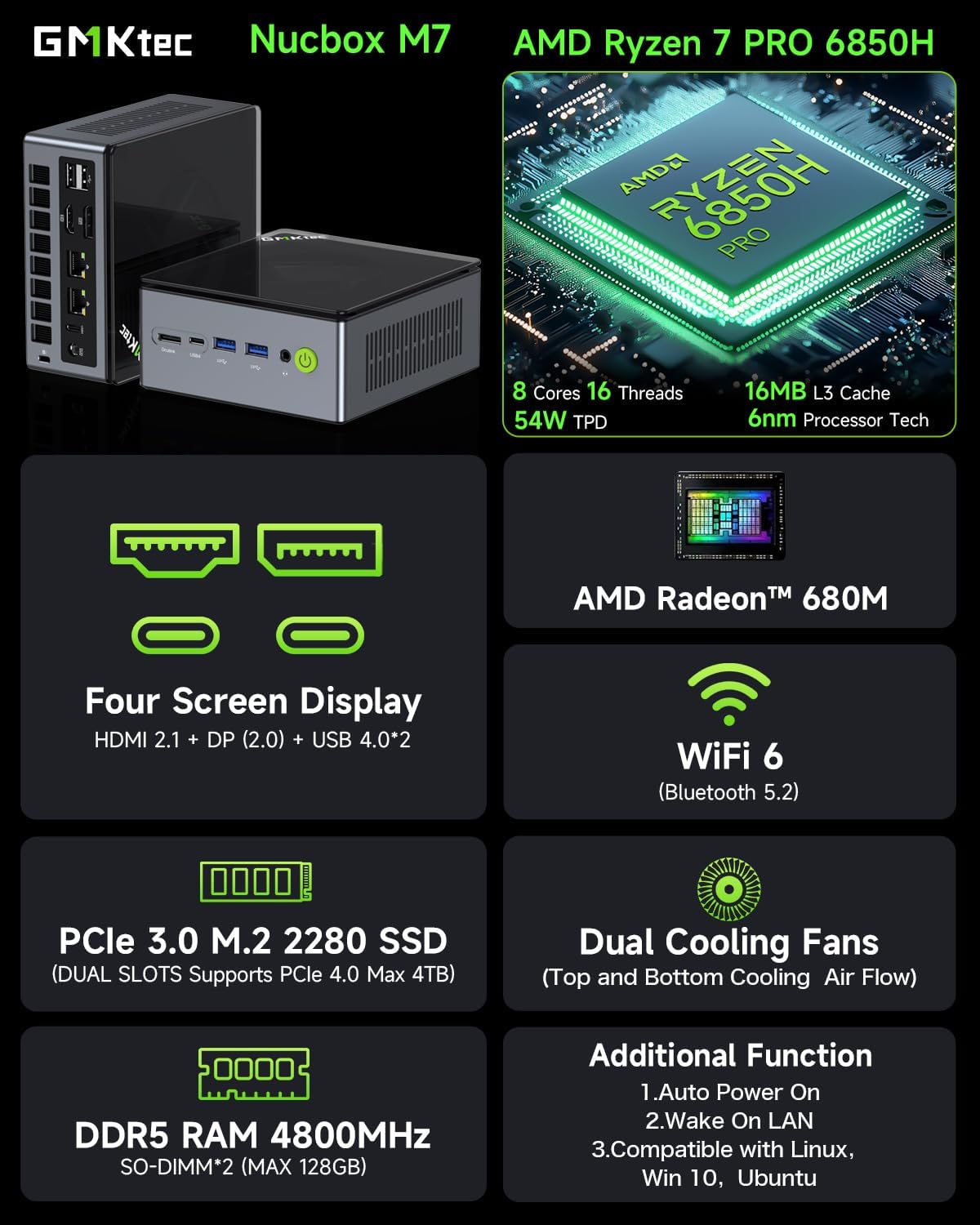
CPU AMD Ryzen 7 Pro 6850H (8C/16T, Up to 4.70GHz, L2 8MB L3 16MB Cache) Graphics GPU AMD Radeon 680M 12 Cores 2200MHz RAM 32GB DDR5 Dual Channel 4800Mhz (16GB*2) Storage 512GB PCIe 3.0 M.2 2280 SSD NVME Wireless LAN Intel I226V DUAL LAN 2500Mbps*2 RJ45, WiFi 6 (2.4GHz/5.0GHz), Bluetooth 5.2 Video output Quad Display Output, HDMI 2.1 (8K@60Hz), DP (4K@144Hz), USB4 (Type-C)*2 Memory Expansion Dual SO-DIMM Slots. Dual Channel MAX. 128GB Storage Expansion Dual M.2 SSD 2280 PCIE4.0*4 Slots. MAX 4TB Other Functions VRAM Adjustment in BIOS, Fan/Power Speed, Wake ON Lan, Auto Power ON, Performance Settings, DMIC Support lnterface 1* DC Jack Port; 1*Oculink Port; 2* USB 4.0 (PD/DP/DATA) Port; 1* HDMI 2.1 Port; 1* DP Port; 2* USB 3.2 Gen2 (10Gbps) Port; 2*USB 2.0 Port; 2* RJ45 (2500Mbps LAN) Port; 1* 3.5mm Audio Jack (HP&MIC) Port Power Adapter DC IN: 19V-6.32A 120W Certification Input: 100-240V AC, 50/60Hz , Output: 19V/6.32A Operating Environment -10°C–45°C,30%–85% Humidity Storage Environment -20°C–60°C,10%–90% Humidity Cooling Method NEW HYPER ICE CHAMBER 2.0 DUAL AIR COOLING FANS. Package Contents 1 x GMKtec Nucbox M7 AMD Ryzen 7 Pro 6850H Mini PC, 1 x Power Adapter, 1 x VESA Mount with Screws, 1 x HDMI Cable, 1 x User Manual
GMKtec M7 AMD Ryzen 7 PRO 6850H Features. Scroll through the Videos & Enjoy!
The video showcases the product in use.The video guides you through product setup.The video compares multiple products.The video shows the product being unpacked. M7 Mini Gaming PC Merchant Video
Unboxing the Nucbox M7 AMD Ryzen 7 PRO 6850H Mini Gaming PC Desktop Computer
Introducing the Improved Nucbox M7 Mini Gaming PC with a translucent top cover that can easily be removed by rotating the cover.
It also comes with a metal chassis and upgraded cooling fans and vents.
The video showcases the product in use.The video guides you through product setup.The video compares multiple products.The video shows the product being unpacked. video Merchant Video
Dual Cooling Fans with Low Noise.
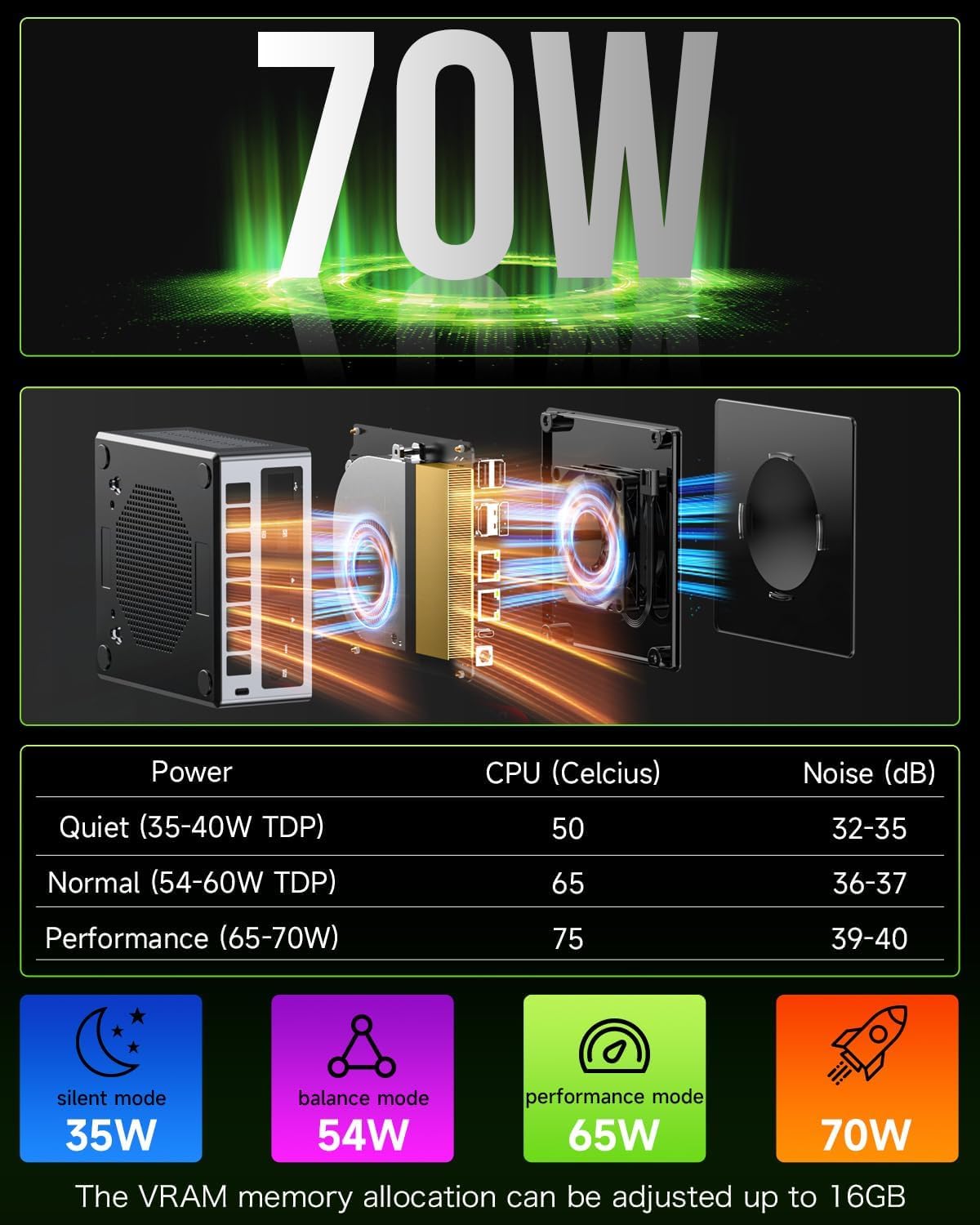
New Hyper Ice Chamber 2.0 Design. Dual cooling fans allows you to work and play without any outside noise Interference.
The video showcases the product in use.The video guides you through product setup.The video compares multiple products.The video shows the product being unpacked. video Merchant Video
Nucbox M7 Gaming Mini PC eGPU Setup Overview
Showcasing the Nucbox M7 eGPU setup connected via Oculink port.
In this video, we will show the how to connect our Nucbox M7 mini pc to the eGPU setup.
The video showcases the product in use.The video guides you through product setup.The video compares multiple products.The video shows the product being unpacked. video Merchant Video
Nucbox M7 Mini Gaming PC Oculink eGPU Gameplay
In this video, we will show the M7 handling some of the most demanding games in FPS and gameplay when the Nucbox M7 is connected via eGPU Oculink port.
The video showcases the product in use.The video guides you through product setup.The video compares multiple products.The video shows the product being unpacked. video Merchant Video
Nucbox M7 Mini PC iGPU Gaming Gameplay Video
In this video, we will show the M7 playing some of the recent AAA game titles with no large drops in fps. This is one of the best value gaming pc in the current marketplace.
The video showcases the product in use.The video guides you through product setup.The video compares multiple products.The video shows the product being unpacked. video Merchant Video
Nucbox M7 4K Video Streaming
In this video, we will show the M7 streaming 4K Videos with ease. Perfect HTPC media player.


1 3 POWER MODES 70W!
2 INTEL DUAL NIC LAN 2.5G
3 HDMI 2.1 8K QUALITY
4 USB4 DUAL PORTS
5 Portable Computer


1 OCULINK PORT
2 QUAD SCREEN DISPLAY
3 DUAL RAM & STORAGE SLOTS
4 RICH INTERFACE
5 UPGRADED COOLING FANS
Add to Cart
Add to Cart
Customer Reviews
4.2 out of 5 stars 174
4.5 out of 5 stars 665
4.5 out of 5 stars 665
4.2 out of 5 stars 330
4.3 out of 5 stars 876
4.4 out of 5 stars 300
4.4 out of 5 stars 300
Price
—
$369.99$369.99
—
$579.98$579.98
$368.00$368.00
$329.98$329.98
$589.99$589.99
Processor
AMD Ryzen 7 PRO 6850H (4.7GHz)
AMD Ryzen 7 PRO 6850H (4.7GHz)
AMD Ryzen 7 7840HS (5.1GHz)
Intel Core Ultra 125H (4.5GHz)
AMD Ryzen 7 5825U (4.5GHz)
Intel Core i5-12450H (4.4GHz)
Intel Core i9-12900HK (5GHz)
Graphics Coprocessor
AMD Radeon 680M 12 Core 2.2GHz
AMD Radeon 680M 12 Core 2.2GHz
AMD Radeon 780M 12 Core 2.7GHz
Intel Arc Graphics 2.2GHz
AMD Radeon 8Cores 2000MHz
Intel UHD Graphics 1.20 GHz
Intel UHD Graphics 1.45 GHz
Memory (RAM) Size
32GB DDR5 Dual Channel 8GB*2
16GB DDR5 Dual Channel 8GB*2
32GGB DDR5 Dual Channel 16GB*2
32GB DDR5 Dual Channel 16GB*2
32GB DDR4 Dual Channel 16GB*2
16GB DDR4 Dual Channel 8GB*2
32GB DDR4 Dual Channel
Hard Disk (ROM) Size
512GB
512GB
1TB
1TB
1TB
512GB
1TB
Core/Threads
8 Cores / 16 Threads
8 Cores / 16 Threads
8 Cores / 16 Threads
14 Cores / 18 Threads
8 Cores / 16 Threads
8 Cores / 12 Threads
14 Cores / 20 Threads
Video Interface
USB 4.0*2/HDMI 2.1/DP USB-C
USB 4.0*2/HDMI 2.1/DP USB-C
USB 4.0/HDMI/DP USB-C Video
TB4 USB-C/HDMI/DPv1.4 Video
USB 4.0/HDMI/DP USB-C Video
2xHDMI (4K@60Hz) & DPv1.4
2xHDMI (4K@60Hz) & DPv1.4
WiFi & Ethernet
DUAL 2.5 RJ45 LAN/WiFi 6/BT5.2
DUAL 2.5 RJ45 LAN/WiFi 6/BT5.2
DUAL RJ45 LAN/WiFi 6E/BT 5.2
DUAL RJ45 LAN/WiFi 6/BT 5.2
DUAL RJ45 LAN/WiFi 6E/BT 5.2
RJ45 LAN/WiFi 6/Bluetooth 5.2
RJ45 LAN/WiFi 6/Bluetooth 5.2
Data Transfer Interface
2xUSB 3.2/2xUSB 2.0/2xUSB 4.0
2xUSB 3.2/2xUSB 2.0/2xUSB 4.0
3xUSB 3.2/1xUSB 2.0/1xUSB 4.0
3xUSB 3.2/1xUSB 2.0/1xUSB-C
2 x USB 3.2 / 2 x USB 2.0
1xUSB-C/3xUSB 3.2/1xUSB2.0
1xUSB-C/3xUSB 3.2/1xUSB2.0
Power Consumption
35W-70W
35W-70W
35W-60W
35W-65W
35W
45W
45W
Oculink Port
✔
✔
✘
✘
✘
✘
✘
Support Ubuntu/Linux/Win 11/10
✔
✔
✔
✔
✔
✔
✔
【Premium Gaming PC Mini Computer】The Nucbox M7 Mini PC is a small form factor Desktop Micro Mini Computer with an AMD Ryzen 7 PRO 6850H (8C/16T up to 4.7Ghz) processor. The GPU is integrated with a powerful AMD Radeon 680M 12 Cores Graphics Card; performance is almost close to that of a full NVIDIA GTX 1050 Ti. Coupled with the support of FSR 3.0+ technology, the computer can handle heavy computing tasks and AAA gaming
【Mini PC Computer with 8K Quad Screen Display】 Nucbox M7 gaming pc is equipped with Dual USB4 USB-C Video output. The latest HDMI 2.1 port can connect to large screen TV and Display Monitors and output up to 8K@60Hz resolution. The Type-C DisplayPort Video output can connect to the latest monitor displays utilizing 4K@144Hz. Features simultaneous four screen display
【Oculink Port】 The M7 Oculink port enables higher bandwidth capabilities, better frame rates and lower lag. The standard also operates at PCIe x4 speeds, compared to Thunderbolt’s x3. Gamers and content creators can benefit from OCuLink’s higher bandwidth, resulting in better performance and lower lag for eGPU setups
【Upgraded Dual Cooling Fans]】Our new Hyper Ice Chamber 2.0 design uses larger top and bottom cooling fans with 360 degrees in and out air flow. The copper base keeps the fan cool and we have lowered the fan noise down to 35dB in Quiet mode
【Three Performance Modes & Updated UEFI (BIOS)】 The M7 mini computer features an all new BIOS update with three performance modes (Quiet 35W, Balance 50W, or Performance 65W-70W). VRAM Allocation is also possible with Auto Power On, Wake-on-LAN options available
【Dual NIC Intel i226V 2.5Gbps + WiFi 6 + BT 5.2 】Dual Intel NIC 2.5G LAN port design provides more applications, such as firewall, multichannel aggregation, soft routing, file storage server, etc. WiFi 6 provides a faster internet experience for browsing, streaming and gaming. Built-in Bluetooth 5.2 is more stable and efficient to connect multiple wireless devices such as projector, printer, monitor, speakers and etc
【32GB DDR5 Dual Channel RAM & 512GB PCIe SSD Dual Slot Expansion】Installed with DDR5 32GB RAM 4800MHz (Dual Channel 2x16B), the Nucbox M7 mini pc support expansion to 128GB RAM. Featured with 512GB M.2 2280 PCIe 3.0 SSD, supports dual slot expansion to 2*PCIe 4.0 2TB SSD up to 4TB. (Upgrades not included)
【Premium PC Build Design】 The M7 mini gaming pc has a beautiful metal chassis and glossy top cover. Easy to remove cover lid, simply rotate the cover counter clockwise and remove. The top cooling fan is custom built and the bottom cooling fan has been upgraded with a copper base
【GMKtec Warranty 】GMKtec offers a 1-year limited warranty for each mini PC, starting from the date of the purchase. All defects due to design and workmanship are covered. With a professional after sales team always ready to attend to your needs, you can simply relax and enjoy your mini PC
 Overview
Bill –
Good mini pc for the money.
I’ve had a Intel NUC with a Core i5 for a little over 6 years but it was starting to show it’s age a bit. One of the ram slots died, it would not boot if I had any ram installed in the second slot. The CPU fan was also wearing out; 3rd party options that I tried were less than stellar. So after dealing with those issues for a little over a year, I decided it was time for a replacement. It was a good pc but it’s time had come.Wanted to stay with a small form-factor pc for various reasons. After checking out other options that are available, I settled on this NucBox K6 from GMKtec. It has a Ryzen 7 7840HS cpu, 32 GB of DDR5 ram and 1 TB NVME drive. I added a spare 1TB NVME drive I had to double my storage as well. Small footprint, supports 3 monitors, option to upgrade/replace components as needed with 2 user-serviceable slots for both m.2 drives ram. It’s also fairly easy to take it completely apart for cleaning the CPU fan. The auxiliary case fan is a standard 40mm x 10mm pc fan; that will be simple to replace when/if the fan dies. Ticks all the boxes for me.After working with this for over a month, I’ve had no issues. There was no extra bloatware installed out of the box that I could find. Windows 11 has been running just fine with updates on. I do a little bit of everything with this computer: I’ve ripped several hundred DVDs and Blurays (with an external Bluray drive and MakeMKV) re-coding said rips with Handbrake for our media server. Some video editing with CapCut. Some light gaming. FreeCAD for designs for my 3d printer. Photoshop. Inkscape. This computer runs circles around my old IntelNUC.All that said, one thing I don’t like about this computer is that there is only one USB C port on the front. The USB C port is what is used for the 3rd monitor hookup. I did not want a cable sticking out of the front for this, so I took it upon myself to address this issue. I designed a new top to replace the top from the factory. It houses a short USB C extension cable with a panel mount jack for ease of installation in the new upper housing. Works great. I can have everything plugged in to the back with minimal excess on the front. The extension plug is also loose enough in the new extended lid to unplug and move aside if I need to plug something in to the USB C port without having to take the new housing apart. I didn’t print it with the best settings and it wound up being a little bit taller than I’d like but works for my needs now.I saw another review complaining that the AMD Ryzen 7 PRO 6850H is not running at the speed listed. The listing on Amazon states 4.7ghz, and his is showing it running at 3.2ghz. The speed listed on the Amazon listing is the turbo speed. If you check AMDs website on the CPU you’ll see it’s normal speed listed at 3.2ghz and it turbos up to 4.2ghz. This CPU is running at spec per AMDs webpage. That is not the CPU that came with mine but I wanted to share that info to avoid confusion. The CPU in mine runs to AMDs specs with no issue.Very happy with my purchase, I hope to get many years of use out of this.
Kaine –
(K12 – Ryzen 7 H 255) Great value, exceptional hardware and connectivity
This is specifically for the K12 with the Ryzen 7 H 255.Honestly, not a bad deal.The CPU is pretty good for its class, and has very acceptable integrated graphics. The H 255 is seemingly only sold to the chinese market, has no real documentation officially (as of the time of writing), and is essentially a recycled die from better chips that didn’t meet the cut so to speak (at least as far as I can find), but I don’t see any of those as a real problem; die recycling is perfectly fine if it actually works and is stable, and AMD is usually pretty good at the latter… and it makes me feel a little better that AMD can save something that would otherwise end up being e-waste. Despite the borderline unofficial nature of the CPU, I have not experienced any performance issues, instability, or crashes of any kind after a few weeks. Note that I updated the BIOS and microcode immediately after receiving the unit, and I suggest everyone do the same.The unit itself is from GMKtec, which is a chinese company. However, there were some (good) surprises in the box that tells me they actually cared about the end user experience, though possibly only just enough to make sure that the average joe blow didn’t immediately return it because they got pissed off at something that would honestly be Microsoft’s fault (eg. the horrendous OOBE for Windows). I choose to believe they actually care though, and somewhat reinforcing that, my email to them was answered the next day (I’ll get to what the contents of that was later).The specs of the unit, aside from the CPU which is pretty good itself, are actually darn incredible. OCuLink is a quasi-rare connector, but an *extremely* welcome one! That significantly improves the unit’s lifespan and enables mostly modern gaming, provided you genuinely do the research into how to use it (remember, don’t plug or unplug it when the PC is on!), though it can already handle light-medium gaming with just the integrated graphics. Though I have not tried the OCuLink port yet, I have no reason to believe it doesn’t work or anything like that. USB4 is also extremely welcome, and I can confirm that it not only works, but it follows best practices of how to implement the protocol. Since the port does do PCIe tunneling, it should work with all Thunderbolt 4 appliances out of the box. GMKtec could have taken the cheap way out and omitted this detail, but they did not. Absolutely incredible to have both of these available.There are also, seemingly (I have not opened the unit up yet, no reason to), three M.2 slots, one at Gen4x4 and two at Gen4x2, which is perfectly fine in terms of speed and great in terms of how many slots they offer. I cannot think of any other mini PC with this level of overall connectivity. You lose out on some external USB connectors that would otherwise be present, but USB4 seriously more than makes up for it. The dual 2.5G LAN ports are just the whipped cream on top of all this.Though, not all can be as good. There is no S3 power state support in the firmware, so you’re stuck with shutting down the computer, hibernating it, or relying on Microsoft’s absolutely abysmal “implementation” of sleep in the form of modern standby (S0). This was confirmed in my aforementioned email to GMKtec’s support. Oh well, I have the whipped cream but miss out on the cherry. This may be an oversight on GMKtec’s part, but it may also be difficulty getting S3 implemented with OCuLink. Don’t know exactly how that works. I’m tempted to knock a star off for this, since S3 is a very, very nice power state to have available, but it’s something I’m personally not terribly concerned about, especially with everything else so good. Please, if you’re reading this GMKtec, add it in a BIOS update! Would love to see it!There may also be an issue with the TPM, specifically in regards to when the firmware tells the OS to initiate S0 sleep (eg. from the power button short pressed). In such an event, when the computer resumes from S0 the TPM will either fail or lock up. This may be an issue with Windows, or with the TPM, or with just my unit, and it requires a reboot to clear it up. Either way, my way around it is to leave the unit turned on or to just shut it down, but again it’s not a concern for me personally, and YMMV.Overall, I would recommend this unit. Though I have not opened it to inspect the internals, nor tested the OCuLink connector yet, I see great value in this unit, and I imagine I will keep it around for a very long time, getting significant usage out of it. I would give it 4.5 stars if that were possible, but for Amazon I will leave it at 5.
Ümit TERZİ –
Harika bir bilgisayar ofisimde kullanıyorum aynı markadan 3. ütünüm.
mark dask –
This is a little diamond – I’ve never owned such a pretty little toy before, and yet it’s really powerful as an everyday PC. Delighted with it; best thing I’ve bought on Amazon, super value 🙂
SkovyrniePL –
Dostarczono nie ten produkt (dostarczono n97 z 12GB RAM i 256GB SSD)
OMR –
Ofiste çok farklı programlar ve uygulamalar kullanıyorum. Fazlasıyla yetiyor. Keyifle çalışıyorum.
Harout jirichian –
👍