USB C SD Card Reader, WNXSLOAD SD Card Adapter with SD MicroSD Dual Slots for iPhone 15 16 iPad Mac MacBook Laptop, USB-C/TypeC High-Speed Trail Camera Memory Card Reader, Plug & Play – 2 Slots
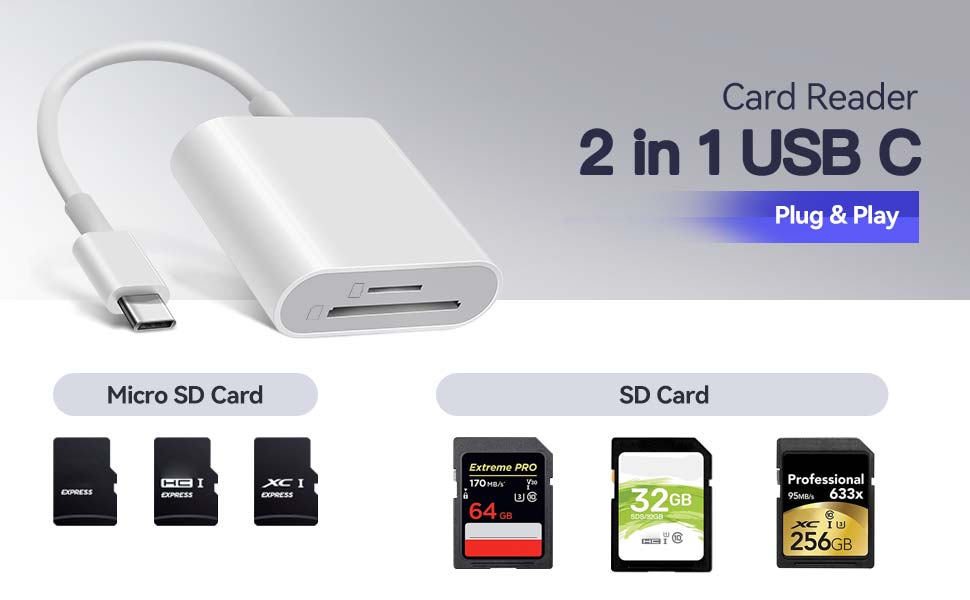
WNXSLOAD 2 in 1 SD Card Reader with SD, MicroSD Dual Slots
Compatible with USB-C iPhone 15 16, Macbook pro, Macbook Air, iPad Pro, Transfer photos/videos from SD Card to USB C Devices Instantly
Download photos and videos from camera to your Type C Phones anytime and anywhere
Using this USB-C SD Card Reader, you can read SD Card or MicroSD Card taken by digital camera, Dash Cam or Trail Camera and read the photos or videos soon.
You can download and share it with your friends or family quickly and easily.
Enjoy fast photo downloads, smooth video editing and fast file transmission
The USB C SD card reader, fast reading and writing the files you need. High transfer speed for easier, smarter life. Just in seconds to quickly transfer the data include pictures, videos, audios and files.
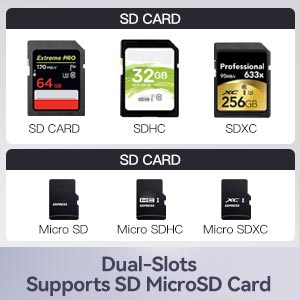
Dual slots for both SD and micro SD cards
The dual slots for both SD and micro SD cards make it easy to transfer files between different devices without having to switch out different adapters. This has been a huge time-saver and has greatly improved workflow.
USB C SD card reader is ideal for iPhone 15 16 series
WNXSLOAD USB-C to SD Card Reader transfers high-resolution photos and videos at high speeds to your USB-C enabled iPhone 15, iPhone 16, Mac, iPad Pro, and Macbook. The photos and videos you take can be quickly shared with family and friends.
SD Card Reader for USB C Phone, USB C iPad, iMac, Macbook Air/Pro
WNXSLOAD Memory Card Reader is perfectly compatible with Mac OS, iPad OS, Windows, Linux, Chrome OS. Convenient to use with a laptop or home computer.
Wide Compatibility
Compatible with USB C iPhone Compatible with iPhone 15, iPhone 15 Plus, iPhone 15 Pro, iPhone 15 Pro Max, iPhone 16, iPhone 16 Plus, iPhone 16 Pro, iPhone 16 Pro Max Compatible with iPad Pro Compatible with iPad Pro 13-inch 1th Gen, 12.9-inch 6th Gen / 5th Gen / 4th Gen / 3th Gen, iPad Pro 11-inch 5th Gen / 4th Gen / 3th Gen / 2th Gen / 1th Gen Compatible with iPad Air Compatible with iPad Air 11-inch 6thGen / 5th Gen / 4th Gen Compatible with iPad mini Compatible with iPad mini 6th Gen Compatible with iPad Compatible with iPad 10.9-inch 10th Gen Compatible with iMac Compatible with iMac(M3,4 Ports/2 Ports), iMac 24-inch(M1,4 Ports/2 Ports,2021), iMac 27-inch(Intel,2020), iMac 27-inch (Intel,2019), iMac 21.5-inch(Intel,2019), iMac 27-inch 2017, iMac 21.5-inch(Intel,2017), iMac Pro(Intel,2017) Compatible with Mac Compatible with Mac mini(M2/M2 Pro), Mac Studio(M2 Max/M2 Ultra), Mac Pro(M2 Ultra), Mac mini(M1,2020), Mac mini(Intel,2018), Mac Studio(M1 Max/M1 Ultra,2022), Mac Pro(Intel,2019) Compatible with MacBook Air Compatible with MacBook Air(M3), MacBook Air 13-inch(M2), MacBook Air 13-inch(M1), MacBook Air 15-inch(M2), MacBook Air(Retina,2018/2019/2020) Compatible with MacBook Pro Compatible with MacBook Pro 16-inch, MacBook Pro 14-inch, MacBook Pro 13-inch Compatible with Samsung Compatible with Galaxy TabPro S 12″, Galaxy S8/S8+/S9/S9+/S10/S10+/S10e/S20/S20 Ultra/S21/S21+/S21 Ultra/S22/S22+/S22 Ultra/S23/S23+/S23 Ultra/Note 8/Note 9/Note 10/Note 10+/Note 20/Note 20 Ultra/Tab S3/Tab S4/Tab S5e/Tab S6/Tab S7, Galaxy Book, Galaxy A5(2017), A8, A9, A20e, A40, A50, A51, A70, A71, A80, A90 Dual Slots Compatibility Compatible with Micro SD, Micro SDXC, Micro SDHC, SD, SDXC, SDHC cards. Note: MS, XD, and CF cards are not supported. System Compatibility Compatible with Mac OS, iPadOS, Windows, Chrome OS, Linux, iOS with USB-C Connector, Android
How to Access Memory Cards on USB-C iPhone/iPad Using the Files App?
Files App is the key tool for iOS to read the external memory card. It’s from iOS built-in app.
Step 1: Prepare the Card Reader:
Insert your memory card (SD/microSD) into the card reader. Plug the Type-C end of the card reader directly into your iPhone 15’s USB-C port.
Step 2: Open the Files App:
Unlike Android, iOS won’t show automatic prompts.
Open the built-in Files app (pre-installed on iOS) directly.
Step 3: Access photos or videos:
Under Locations, you’ll see the memory card listed (e.g., “NONAME,” “Untitled,” or the card’s name).
Tap it to view all photo, videos or files on the memory card.
You can view, copy, move, and delete photos on the memory card just as you would on a computer.
FAQ:
Incompatible devices?
This SD card reader is designed with a USB-C interface and is not compatible with iPhones equipped with a Lightening interface.
Incompatible camera cards?
This SD card reader is designed with dual card slots and supports common SD and microSD cards. It does not support older XD, MS, and CF cards.
No response on iPhone 16?
Since iOS 13, you need to manually open the Files app to access the contents of the memory card.
Plug-and-Play – This USB C SD card reader no need to download Apps, no drivers, no fuss—just connect and go. Portable and Easily transfer the photos and videos from SD/MicroSD Card to USB-C devices . With the memory card reader, share videos or pictures with others at any time. No need to use PC anymore, Fast and easy. Dual Card Slots – WNXSLOAD USB-C SD Card Reader design with dual slots Includes both an SD and a microSD card slot. Make it easier and more efficient for photographers to transfer photo video. Works flawlessly on USB-C iPhone – The WNXSLOAD SD Card Reader supports iPad, Mac, iMac and Macbook, Plug and Play without drivers. and crucially, it is compatible with the lastest iPhone 15 or iPhone 16 models, works with iOS’s Files app. Quickly Transfer – The USB C SD card reader, fast reading and writing the files you need. High transfer speed for easier, smarter life. Just in seconds to quikly transfer the data include pictures, videos, audios, and files from your cards to USB C Devices. Wide Compatibility – Compatible with iPhone 15 / 15 Pro/ 15 Pro Max / 16 / 16 Plus / 16 Pro / 16 Pro Max. Compatible with iPad Pro 12.9-inch 6th Gen / 5th Gen / 4th Gen / 3rd Gen, 11-inch 4th Gen / 3rd Gen / 2nd Gen / 1st Gen. Compatible with iPad 10.9-inch 10th Gen / 10.2-inch 9th Gen. Compatible with iPad Air 10.9-inch 5th Gen / 4th Gen. Compatible with iPad mini 8.3-inch 6th Gen. Compatible with MacBook Pro (2025~2016), MacBook (2025~2015), iMac Pro (iMac), Samsung Galaxy Tab Pro, S23/S22 Ultra/ S21/ S20/S8/Note 8/Note 9 and most other USB-C devices. Fast and Reliable for Camera Workflow – The WNXSLOAD SD Card Reader is a photography accessory designed specifically for Kodak, Canon, and Nikon digital SLR cameras, simplifying the photo transfer process. – Plug the SD card reader into your iPhone or iPad and use the built-in “Photos” app in iOS to import camera’s photos and videos with a single click. Or use the built-in “Files” app in iOS to import and export any files. Note – This USB-C SD card reader is specifically designed for MicroSD (TF) and SD cards. Please note it is not compatible with less common formats like XD Cards or MS Cards.
Specification
Overview
Customer Reviews
Rated 0 out of 5
13 reviews
Rated 5 out of 5
0
Rated 4 out of 5
0
Rated 3 out of 5
0
Rated 2 out of 5
0
Rated 1 out of 5
0
13 reviews for USB C SD Card Reader, WNXSLOAD SD Card Adapter with SD MicroSD Dual Slots for iPhone 15 16 iPad Mac MacBook Laptop, USB-C/TypeC High-Speed Trail Camera Memory Card Reader, Plug & Play – 2 Slots
Super portable and easy to use
This iPhone SD card reader has been super handy and I’m really impressed with it. It’s small and portable, so I can take it anywhere without it taking up space. The best part is that I don’t need a computer to transfer my photos—it plugs right into my phone and makes the whole process so much easier. It works quickly and has saved me so much time when I need to clear off my camera card. Overall, it’s a great little tool to have and totally worth it.
Great Little SD Card Reader
The SD card reader is simple to set up and works quickly. I like that it supports both microSD and standard cards. Transfers photos and videos smoothly, and it’s compact enough to carry anywhere. For the price, it’s a great value.
Fast, Reliable, and Exactly What I Needed for My Camera Workflow
I recently picked up this USB-C card reader to streamline my photo transfers, and it’s been a fantastic addition to my gear. As a photographer, speed and reliability are critical—this card reader delivers both.Right out of the box, it feels well-made and durable, with a compact design that’s perfect for tossing in my camera bag. The USB-C connection is a major plus—file transfers from my SD cards are lightning-fast compared to older USB 2.0 readers I’ve used. It handles large RAW files with ease and doesn’t overheat, even during extended use.What really impressed me is its plug-and-play simplicity. No drivers, no fuss—just connect and go. It’s compatible with all the devices I use, from my laptop to my tablet, and it’s never missed a beat.If you’re looking for a dependable, high-speed card reader that keeps up with modern workflows, this one is a solid investment. It’s made post-shoot file management quicker, smoother, and a whole lot less frustrating.
Compact, Fast, and Reliable USB C SD Card Reader
I’ve been using the WNXSLOAD USB C SD Card Reader regularly to transfer photos from my camera to my MacBook and iPad, and it works flawlessly every time. The plug-and-play design means no drivers or extra apps—just plug it in and it’s ready to go, which is perfect for on-the-go editing. The dual slots for SD and microSD cards add versatility, and the transfer speeds are impressively fast, saving me time during busy shoots. It fits easily in my camera bag, and I appreciate the build quality that feels sturdy but lightweight. This reader has become an essential, hassle-free accessory for my photography work.
Works Just as Advertised!
I picked up this card reader to move photos from my memory cards to my MacBook and my iPhone, and it works exactly as expected. Plugging it in is seamless; both devices recognize it instantly without any driver installs or delays. I’ve cycled through three different cards from my DSLR and action cam, and it handled each one flawlessly. Transfers stay fast even when I’m copying hundreds of RAW files at once. I’ve never seen a corrupted photo or lost connection, which gives me peace of mind when backing up important shots.The reader’s build feels solid and the aluminum casing adds a bit of weight without being bulky. Each slot holds the card snugly, so there’s no wobble or risk of it falling out if I bump my desk. It slips into my laptop bag alongside my charging cables, and the short built-in cable never gets tangled. For the price, it delivers reliable performance day after day. If you need a no-nonsense, dependable way to move large batches of photos between cards and your Apple devices, this is a smart pick.
Wonderful USB C Card Reader!
I bought this for my teenage granddaughter who says it works great for her camera. She simply removes the storage card and pops it in the card reader and she has instant access to her photos. The price was great too.She’s very pleased and so am I.
Works but….
I got this device to be able to connect two external hard drives to my mac for dual (mirror) backups. ERROR!!! When you plug the second hard drive, it disconnects the first hard drive, without proper ejection of the unit, as you will see the message in the mac for such mistake. Otherwise it works. Reads the card, charges the mac and connects one HD.
works well and is easy to use (which is just as well as the instructions are awful). Looks and feels well made so hopefully should last and is good value for money.






 Overview
Demian Solis –
Super portable and easy to use
This iPhone SD card reader has been super handy and I’m really impressed with it. It’s small and portable, so I can take it anywhere without it taking up space. The best part is that I don’t need a computer to transfer my photos—it plugs right into my phone and makes the whole process so much easier. It works quickly and has saved me so much time when I need to clear off my camera card. Overall, it’s a great little tool to have and totally worth it.
Jenna –
Great Little SD Card Reader
The SD card reader is simple to set up and works quickly. I like that it supports both microSD and standard cards. Transfers photos and videos smoothly, and it’s compact enough to carry anywhere. For the price, it’s a great value.
Arod –
Fast, Reliable, and Exactly What I Needed for My Camera Workflow
I recently picked up this USB-C card reader to streamline my photo transfers, and it’s been a fantastic addition to my gear. As a photographer, speed and reliability are critical—this card reader delivers both.Right out of the box, it feels well-made and durable, with a compact design that’s perfect for tossing in my camera bag. The USB-C connection is a major plus—file transfers from my SD cards are lightning-fast compared to older USB 2.0 readers I’ve used. It handles large RAW files with ease and doesn’t overheat, even during extended use.What really impressed me is its plug-and-play simplicity. No drivers, no fuss—just connect and go. It’s compatible with all the devices I use, from my laptop to my tablet, and it’s never missed a beat.If you’re looking for a dependable, high-speed card reader that keeps up with modern workflows, this one is a solid investment. It’s made post-shoot file management quicker, smoother, and a whole lot less frustrating.
Rayath –
Compact, Fast, and Reliable USB C SD Card Reader
I’ve been using the WNXSLOAD USB C SD Card Reader regularly to transfer photos from my camera to my MacBook and iPad, and it works flawlessly every time. The plug-and-play design means no drivers or extra apps—just plug it in and it’s ready to go, which is perfect for on-the-go editing. The dual slots for SD and microSD cards add versatility, and the transfer speeds are impressively fast, saving me time during busy shoots. It fits easily in my camera bag, and I appreciate the build quality that feels sturdy but lightweight. This reader has become an essential, hassle-free accessory for my photography work.
Amazon Customer –
Good product
Daughter needed this for her new camera. It arrived promptly and worked great.
Amazon Customer –
Works Just as Advertised!
I picked up this card reader to move photos from my memory cards to my MacBook and my iPhone, and it works exactly as expected. Plugging it in is seamless; both devices recognize it instantly without any driver installs or delays. I’ve cycled through three different cards from my DSLR and action cam, and it handled each one flawlessly. Transfers stay fast even when I’m copying hundreds of RAW files at once. I’ve never seen a corrupted photo or lost connection, which gives me peace of mind when backing up important shots.The reader’s build feels solid and the aluminum casing adds a bit of weight without being bulky. Each slot holds the card snugly, so there’s no wobble or risk of it falling out if I bump my desk. It slips into my laptop bag alongside my charging cables, and the short built-in cable never gets tangled. For the price, it delivers reliable performance day after day. If you need a no-nonsense, dependable way to move large batches of photos between cards and your Apple devices, this is a smart pick.
Aleda Ziegler –
Wonderful USB C Card Reader!
I bought this for my teenage granddaughter who says it works great for her camera. She simply removes the storage card and pops it in the card reader and she has instant access to her photos. The price was great too.She’s very pleased and so am I.
MCGL –
Works but….
I got this device to be able to connect two external hard drives to my mac for dual (mirror) backups. ERROR!!! When you plug the second hard drive, it disconnects the first hard drive, without proper ejection of the unit, as you will see the message in the mac for such mistake. Otherwise it works. Reads the card, charges the mac and connects one HD.
Amazon Customer –
works well and is easy to use (which is just as well as the instructions are awful). Looks and feels well made so hopefully should last and is good value for money.
Chester Anderson –
Arrived earlier than expected.thanks
ww28g5Pender Ng –
Easy to use.
Toqir –
On time get the item.good quality
David Nuttall –
Fantastic just what I need