
-31%
Sale!


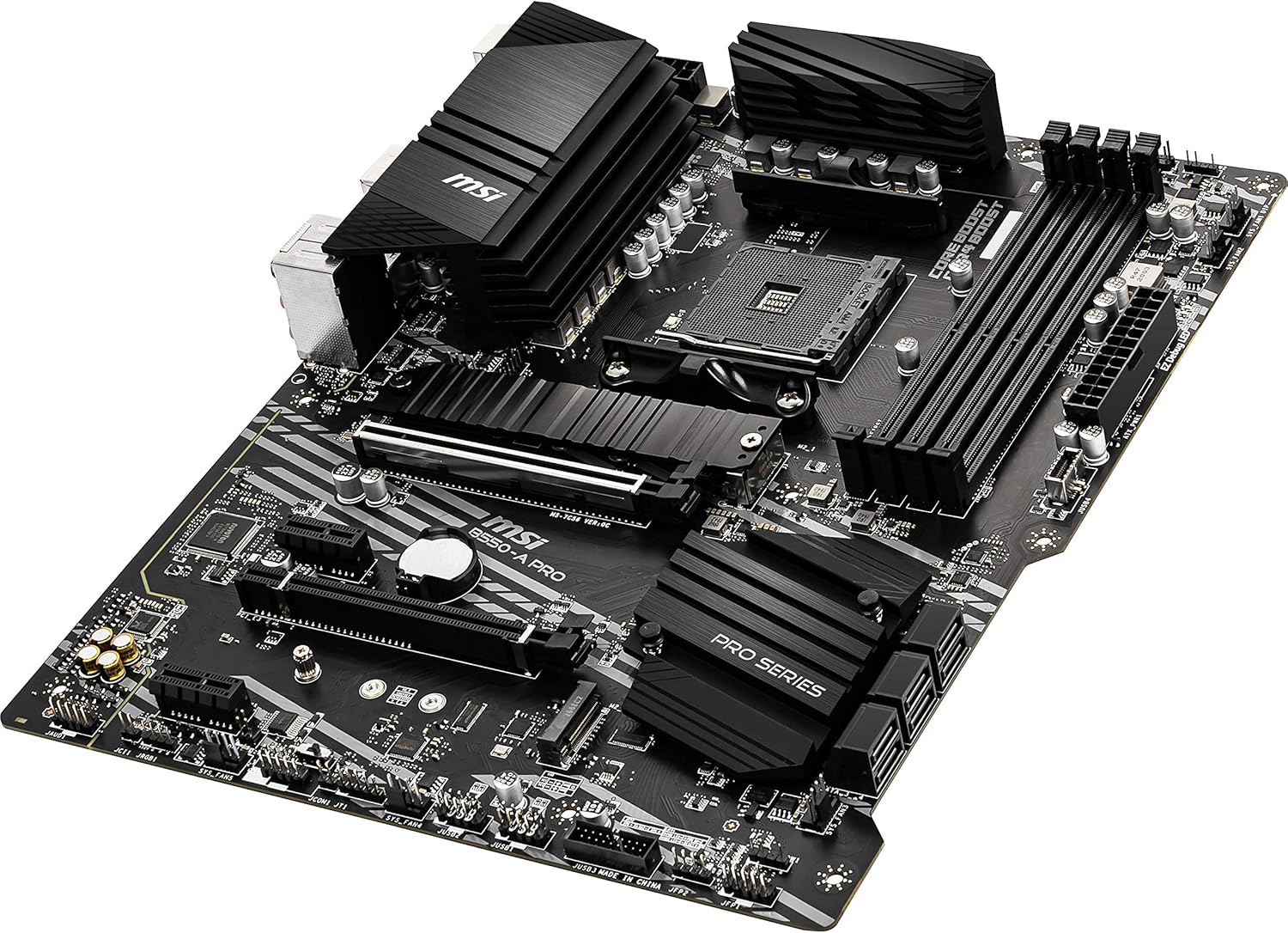


Powered by AMD Ryzen AM4 processors, the MSI B550-A PRO combines stable functionality and high-quality assembly to solve professional workflows. Extended Heatsink Design and Core boost keep critical components operating reliably. PCIe 4.0 slots and M.2 with Shield Frozr provides the latest in device connectivity.
Support for 3rd Gen AMD Ryzen processors and future AMD Ryzen processors with BIOS update.Audio ports (Rear) : Realtek ALC892/ALC897 Codec
Supports dual channel DDR4 memory up to 128 GB (4400 MHz)
Lightning Fast Game experience: PCIe 4.0, Lightning Gen 4 M.2 with M.2 Shield Frozr, AMD Turbo USB 3.2 GEN 2
Core Boost technology combines optimized power circuit layouts and digital power regulation which allows for precise and steady current delivery to the CPU
AUDIO BOOST rewards your ears with studio grade sound quality for immersive gaming experiences
Premium Thermal Solution: Heatsink thermal pad rated for 7W/mk and PCB with 2oz thickened copper
Flash BIOS Button lets users flash the BIOS even without a CPU or memory
Powerful Design: Core Boost, Digital PWM IC, 2oz Thickened Copper PCB, Creator Genie, DDR4 Boost
 Overview
Kevin A. –
Solid, Reliable, and Feature-Packed Midrange Motherboard
The MSI B550-A PRO is an excellent motherboard for anyone building a Ryzen-based PC, especially if you want solid performance without breaking the bank. Here’s why I’m impressed:Build Quality: The board feels sturdy with quality components and good cooling solutions, including extended heatsinks on the VRMs. This helps with stable overclocking and long-term reliability.Performance: It supports Ryzen 3000 and 5000 series CPUs flawlessly, with PCIe 4.0 support for faster NVMe SSDs and next-gen GPUs. I noticed fast boot times and smooth system responsiveness.Connectivity: Plenty of USB ports, including USB-C, multiple fan headers, and M.2 slots make this board very versatile. The Realtek LAN is reliable for stable wired connections.BIOS & Software: MSI’s BIOS is user-friendly and offers plenty of tweaking options for beginners and enthusiasts alike. The software suite is helpful for monitoring and system tuning.Value: Compared to other B550 boards, this one offers great features and solid performance at a competitive price. It’s perfect for midrange gaming rigs or workstations.Overall, if you want a dependable motherboard that won’t hold back your Ryzen CPU and offers future-proof features like PCIe 4.0, the MSI B550-A PRO is a smart choice. Highly recommended!
Rick S –
Great motherboard!
Why did you pick this product vs others?:I had to buy a new motherboard and CPU after my Seasonic power supply melted down. I’ve used a MSI MB’s for years and they have been easy to manage and rock-solid. I don’t overclock, and I run 64GB of memory, and the board had run perfectly since installation 7 months ago. BIOS upgrades are easy, and managing memory and peripherals is also simple.
J. Huebner –
Great, basic board.
This is a great, basic board. After a frustrating few days trying to get an ASRock Rack server board to even post, this dropped in like a breath of fresh air. Intuitive BIOS, awesome live tech support, etc. I plan to use MSI on my next build too.
AmazonBuyer –
So far so good
I choose this motherboard after reading countless reviews because of sobriety, very good VRM and nice features, including USB-C for the price. What I want is a good, fast, stable and long lasting PC for the next 10+ years or so. I won’t be doing any overclock, just regular stuff and gaming. Can’t say about the RGB lights because I turned them off right away before assembly with the handy switch at the lower end.My build:* MSI B550-A PRO. This beauty. Again, the VRM is very important for durability.* Corsair Vengeance LPX 32GB (2 X 16GB) DDR4 3600. Plenty for the time being and detected automatically in the BIOS.* AMD Ryzen 7 5700G. If you intend to use the integrated graphic card in this processor, buy DDR4 3600 RAM because it is faster for shared memory.* Samsung 980 SSD 1TB. Great quality, durable and very fast. The main NVMe slot, don’t forget, has better I/O speed vs the second one at the bottom.* A nice, generic case with frontal USB-C.Works fine with Windows 10 Pro but It’s also compatible with Linux out of the box. Tested distros: MX Linux 21 (AHS), Manjaro and Mabox Linux. I don’t like Win11 but the BIOS has fTPM and a TPM connector if you want to buy your own.
Wayne Conley –
BIOS version info on new mobo’s should be included in the box!
I was going to update an MSI B450 mobo and put a 5800x in it but decided to upgrade to this B550 A-Pro. I figured since it’s Gen 4 and has another M.2 slot it would be great. I was thinking it might need an update right out of the box for the 5800x, but really wasn’t expecting the frustration ahead. All done with install, I pushed the power button and got the solid white cpu debug lite, and was locked out of even the bios screen. All fans spun, but no post, or video out to monitor. Then tried reseating ram, cpu, checking board power connectors, all w/no luck. Then researched and completed a no cpu bios flasback with latest bios. Thumbdrive flashed for a while then stopped, so I thought I licked it. Then I saw that it wasn’t going to shut down for restart on it’s own when it should have done so, so I forced shutdown. Long story short…after retrying posts unsuccessfully many times after bios flashing I had a 2700x on hand to install. No cpu debug now, but a vga one!!! Grrrrr……….I solved it by checking and reseating the power leads for the gpu, and it finally posted. Bios info confirmed the flash I did 4 hrs ago took, and was now up to date, but never posted until I put in the older cpu. Now…hear this M.S.I., both the B550 mobo and 5800x released at about the same time, in fact, about 6 mo. apart, so I shouldn’t be having this issue. I then resolved to reinstall the 5800x on the chance of it working now, after the bios had got a full load-in and finalization. It did, thank God, ’cause if it hadn’t it would’ve been disassembled and put right back in the box for RMA, despite the extra work and hassle. I’ve put together about 25 pc’s but this turned into THE MOST frustrating build for me, eating 12 hours of my day for the full build, when normal may be 4-6 hrs. It’s been a few days and it’s run perfectly fine since that mess, but I’ll think twice about ordering another MSI mobo.Update 11-14-2024Although I only gave 4 out of 5 rating at first, I would bump it up to a 4.75 if I could. Like many have said in reviews here, update the bios! The old BIOS that it shipped with really riled me up at the time, and luckily I had an old 2700x to get it to post before installing the 5800x. But I must say that after I got it running, finished set up and tweaked the settings, I haven’t had any trouble at all. No crashes to speak of, and it’s run beautifully. BIOS updates go smoothly and it now rocks a 5800x3d with the original 7900 XT gpu. It’s turned out great, and I even went with another MSI mobo, a B650 Tomahawk Wi Fi. I’m happy with it now, but it also had it’s issues, to say the least…like almost 2 minute post times. Google it. Most problems have smoothed out with BIOS updates now, but that’s a whole other story in itself.
Arturo –
Buena placa
Placa con buenas prestaciones y suficientes conexiones para usb, fans y leds argb, construcción firme y buena disipación pasiva. sin problemas con controladores y funcional el software de manejo de rgb de msi.Llegó bien empacado y sin contratiempos a Colombia.
R. Shabayek –
I flashed the BIOS, did everything I can think of, and still I get random BSOD: memory corruption, bad drivers, many various errors from Windows 10. I searched online and found out that other people complain from the same Motherboard model for random erros. I didn’t expect this from MSI and doubt they would replace my motherboard, but my next Motherboard won’t be an MSI for sure. You lost me MSI.
Adi –
Great price for a more budget oriented AM4 motherboard. Preparing it is even easier since it’s already ready for Ryzen 5000 CPUs. Only critique I have is the rear i/o shielding feels low quality but this isn’t a serious problem since people shouldn’t look at the back of the case.
abdulaziz –
تمت تجربتها مع معالج 5600 رائعه بمعنى الكلمة بسعر منافس 480 ريال مع 2 usb type cو 10+2 VRAM تعطيك بوست بدون ضغط مع استقرار و جودة البورد واضحه مع العلم انها وصلتني بدون amd5000 ready وقمت بعمل تحديث للبايوس قبل تركيب المعالج عن طريق الفلاش بايوس وعملت بكل سلاسه من اول تشغيلالبايوس رائع وواضح ومنظم من شركة MSI بعكس شركة gigabyte المعقد خصوصا عند تحديثهاعجبني وجود 8 مقابس للمراوح لاني استخدمتها على corsair 4000d airflow وركبت 5 مراوح غير مروحه المشتتالصوت ممتاز ونقي في الالعاب وغيرهاتتميز بوجود اثنينusb3.2 gen1 بسرعة 5gb وواحد gen2 بسرعة 10gb وtype-c 10gb كلها متصله مباشرة مع المعالجانصح بشده لمن يرغب باداء فوق المتوسط بسعر منافس مع اني كنت محتار بينها وبين pro-vdh ولكن لامقارنه بينهما ولايهم ال واي فاي مقابل الميزات السابقه
Axel Enrique Yerena Merlin –
Al principio pensé que no servía pero después de tanto cambio de cables estar cambiando 2 veces de placa el error era de drivers xd, dejando eso de lado es muy bella la placa pese a lo simple que se ve comparadas con otras PERO cumple su función tiene muchas entradas puertos que nunca en mi vida había visto excelente distribución de entradas, vino en excelente empaquetado venia con sus respectivos cables y otras cosas, realmente antes de cambiar de placa chequen sus drivers.
Banana123 –
I recieved a dead part… everything else I bought to build the PC works just the Motherboard I bought from you doesn’t work at all spent all that money for what pieces of plastic and wires.